
Your restaurant doesn’t operate in isolation. You’ve got a marketing platform to nurture customer relationships, messaging tools to keep customers informed, accounting software to track finances, and perhaps an ERP system tying it all together. The challenge? Getting all these systems to talk to each other automatically.
That’s where TypeMenu webhooks come in—and when you combine them with Zapier, you can connect your restaurant to virtually any software you use.
What Are Webhooks?
Think of webhooks as instant notifications. When something happens in TypeMenu—a new order comes in, a customer signs up, an order status changes—TypeMenu can immediately tell other systems about it.
Unlike traditional integrations that check for updates every few minutes (or hours), webhooks work in real-time. The moment a customer places an order, your other systems can know about it within seconds.
Why Zapier Changes Everything
Zapier acts as a universal translator between apps. It can receive webhooks from TypeMenu and then do almost anything with that data—send an email, add a row to a spreadsheet, create a contact in your CRM, trigger an SMS, and thousands of other actions.
The beauty of Zapier is that you don’t need to write any code. You simply:
- Set up a webhook in TypeMenu pointing to a Zapier webhook URL
- Tell Zapier what to do when it receives that webhook
- Let the automation run
High-Value Events for Restaurants
TypeMenu sends webhooks for many events, but three stand out as particularly valuable for restaurant automation:
Order Created
Triggered the instant a customer places an order. The webhook includes everything: customer details, items ordered, delivery address, order total, and more. This is your gateway to order-based automations.
Order Status Updated
Fires whenever an order moves through your workflow—confirmed, preparing, ready, completed, or cancelled. Perfect for keeping customers informed through your preferred channels.
Customer Created
Triggered when a new customer creates an account. This is gold for marketing automation—welcoming new customers, adding them to your mailing list, or triggering loyalty programme enrolment.
Real-World Use Cases
1. Automatically Add New Customers to Mailchimp
The problem: You want to build an email list of your customers, but manually exporting and importing contacts is tedious and means you’re always working with stale data.
The solution: When a customer creates an account on TypeMenu, automatically add them to your Mailchimp audience.
How it works:
- Create a webhook in TypeMenu for the “Customer Created” event
- Point it to a Zapier webhook trigger
- In Zapier, add an action to create a subscriber in Mailchimp
- Map the customer’s name and email from the webhook data
Now every new customer automatically joins your mailing list. You can segment them, send welcome sequences, and run promotional campaigns—all without lifting a finger.
2. Send Order Updates via WhatsApp
The problem: Email notifications often go unread, and you want a more direct way to update customers about their orders.
The solution: When an order status changes to “Ready”, send the customer a WhatsApp message.
How it works:
- Create a webhook for “Order Ready” events
- Connect to Zapier and use the Twilio or WhatsApp Business action
- Compose a message like “Your order #[order_number] is ready for collection!”
- Include the customer’s phone number from the webhook data
Customers get instant notifications where they’re most likely to see them.
3. Track Orders in Google Sheets
The problem: You need a simple way to analyse orders, spot trends, or share data with your accountant—without logging into TypeMenu constantly.
The solution: Log every order to a Google Sheet automatically.
How it works:
- Create a webhook for “Order Created” events
- In Zapier, add a “Create Spreadsheet Row” action
- Map fields: order number, customer name, items, total, timestamp, order type
Now you’ve got a live spreadsheet of all orders that you can filter, chart, and share. Perfect for weekly reviews or tax preparation.
4. Send SMS Confirmations
The problem: You want to confirm orders immediately but don’t want to rely solely on email.
The solution: Send an SMS when an order is placed.
How it works:
- Set up a webhook for “Order Created”
- Use Zapier’s Twilio, MessageBird, or ClickSend integration
- Send a confirmation: “Thanks for your order! We’ve received order #[order_number] and it’ll be ready in approximately [prep_time] minutes.”
Quick, reliable, and customers love the instant confirmation.
5. Create Accounting Entries
The problem: Manually entering orders into Xero, QuickBooks, or Sage is time-consuming and error-prone.
The solution: Automatically create invoices or sales entries when orders are completed.
How it works:
- Create a webhook for “Order Completed” events
- In Zapier, connect to your accounting software
- Create an invoice or sales receipt with line items and totals
Your books stay up to date without the data entry headache.
6. Feed Customer Data to Your ERP
The problem: Your ERP is the source of truth for your business, but restaurant data lives in TypeMenu.
The solution: Push order and customer data to your ERP in real-time.
How it works:
- Set up webhooks for relevant events (orders, customers)
- Use Zapier’s webhooks or API request actions to push data to your ERP
- Map TypeMenu fields to your ERP’s data structure
Whether you’re using SAP, Microsoft Dynamics, or a custom system, webhooks provide the bridge.
7. Trigger Post-Order Surveys
The problem: You want customer feedback but asking manually is inconsistent.
The solution: Automatically send a feedback request after an order is completed.
How it works:
- Create a webhook for “Order Completed”
- Add a delay in Zapier (give them time to enjoy the food!)
- Send an email or SMS with a link to your SurveyMonkey, Typeform, or Google Form
Consistent feedback collection without any manual effort.
8. Alert Staff via Slack
The problem: You want your team to know immediately when high-value orders come in.
The solution: Post to Slack when orders over a certain value are placed.
How it works:
- Set up a webhook for “Order Created”
- In Zapier, add a filter for orders above your threshold (e.g., over £50)
- Post a message to your #orders Slack channel
Your team stays informed without constantly watching the orders screen.
Getting Started
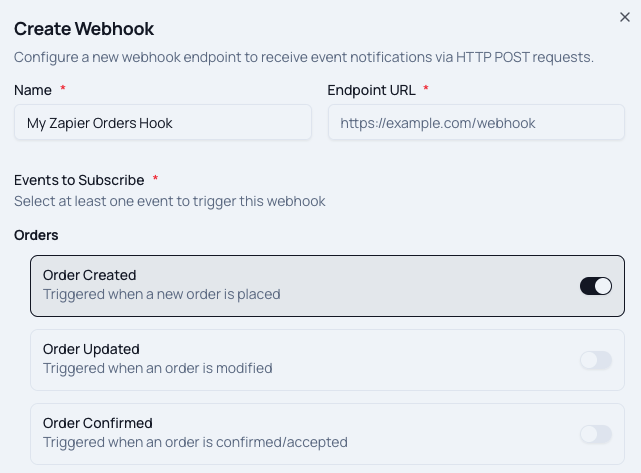
Step 1: Create Your Webhook in TypeMenu
- Go to Settings > Webhooks (in the Integrations section)
- Click Add Webhook
- Give it a name (e.g., “Zapier - New Customers”)
- For the URL, you’ll get this from Zapier in the next step
- Select the events you want to trigger this webhook
- Enable signature verification for security (recommended)
Step 2: Set Up Your Zapier Zap
- Log into Zapier (or create a free account)
- Create a new Zap
- Choose Webhooks by Zapier as your trigger
- Select Catch Hook as the trigger event
- Zapier will give you a webhook URL—copy this
- Paste this URL into your TypeMenu webhook configuration
- Save and test the webhook
Step 3: Add Your Actions
- In Zapier, click the + to add an action
- Search for your destination app (Mailchimp, Slack, Google Sheets, etc.)
- Choose what you want to do (add subscriber, send message, create row)
- Map the fields from your TypeMenu webhook data
- Test and turn on your Zap
Tips for Success
Start simple: Begin with one automation that solves a real pain point. Once that’s working, add more.
Test thoroughly: Use test orders to verify your automations work before going live. TypeMenu’s webhook logs show you exactly what data is being sent.
Handle errors: Zapier can notify you if a step fails. Enable error notifications so you know when something needs attention.
Mind the limits: Zapier’s free tier has task limits. If you’re processing hundreds of orders daily, you may need a paid plan.
Document your Zaps: Keep notes on what each automation does. Future you (or your team) will thank you.
The Bigger Picture
Webhooks and Zapier aren’t just about saving time—though they certainly do that. They’re about building a connected restaurant operation where data flows seamlessly between systems.
When a customer orders from your TypeMenu storefront:
- Your marketing platform knows they’re a customer
- Your accounting software records the sale
- Your team gets notified in Slack
- The customer receives confirmation via their preferred channel
- Your spreadsheet logs the order for analysis
All of this happens automatically, in real-time, without anyone touching a keyboard.
What Will You Connect?
TypeMenu webhooks give you the building blocks. Zapier provides the connections. The question is: what tedious manual task will you automate first?
Whether it’s marketing, operations, finance, or customer communication, there’s probably a Zap for that. And if there isn’t, you can build one in minutes.
Ready to get started? Head to Settings > Webhooks in your TypeMenu dashboard and create your first webhook. Your future self—the one not copying data between systems—will thank you.